SCIO Services Not Installing on a Windows Tablet (Error 1060)
Problem Description
For Mirus and SCIO integration (i.e. on an H3 GrainGage), the SCIO Services act as the background communication layer between Mirus and the SCIO NIR sensor. Given that you're receiving Error 1060, it suggests Windows cannot find the SCIO service that should have been installed and the installer failed to register the service. Error 1060 is a Windows Service Control Manager error that means: “The specified service does not exist as an installed service.”
Solution
Error 1060 typically means one or more of the following:
- The SCIO Services installer did not complete successfully.
- A prerequisite (often a .NET runtime) is missing.
- A previous SCIO installation was partially removed.
- Antivirus or Windows permissions prevented service registration.
The following steps will help you troubleshoot and correct this issue:
- In the event you received an error 1060, the services are most likely not installed and/or properly registered. However, it might be a good idea to check just in case:
- Click on the Microsoft Windows magnifying glass and search for "Services."
- After running the Services app, search for "SCIO Service."
-
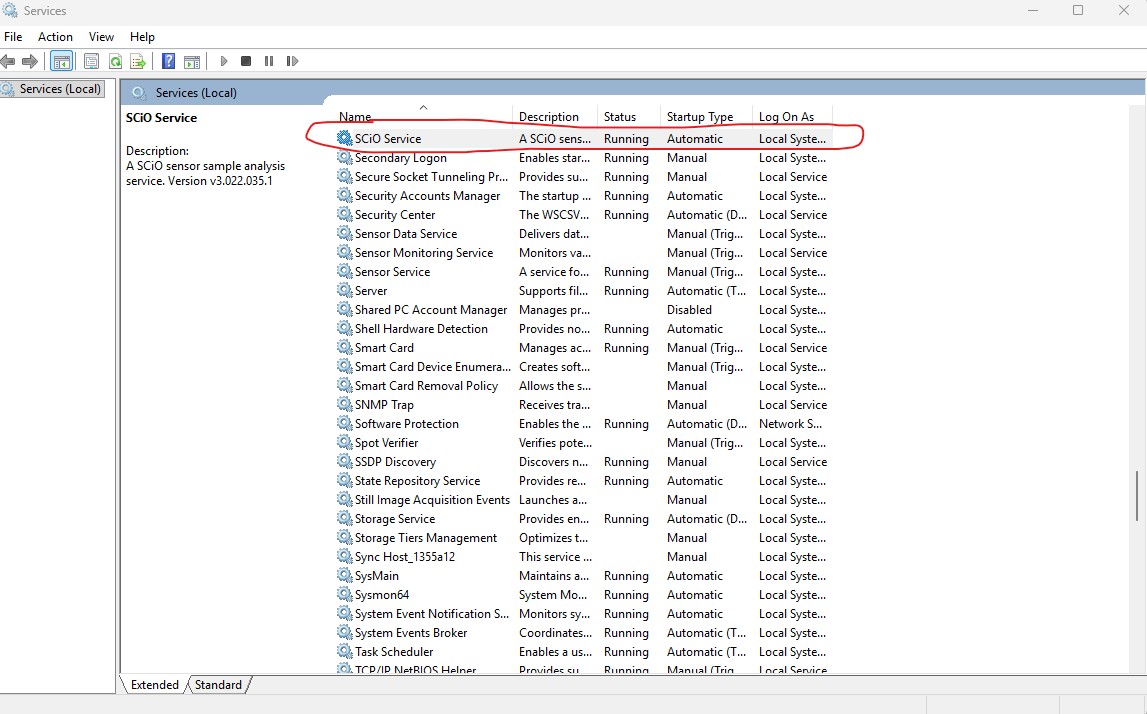
- If the SCIO services are listed but the "Status" is blank (i.e. not running), right click on the "SCIO Service" name and click "start."
- If the SCIO services still do not start, restart your computer
- If the Services are listed and status is "Running," the services installed correctly and are working properly.
- If the SCIO services installer did not complete successfully and is not listed, do the following:
- Install .Net8 SDK: https://builds.dotnet.microsoft.com/dotnet/Sdk/8.0.417/dotnet-sdk-8.0.417-win-x64.exe
- Restart computer
- Reinstall the SCIO services
- Repeat step #1
- If the SCIO services are still not listed, then ensure you have administration rights and/or disable any Antivirus applications running in the background and try installing again.
For further assistance, contact the HarvestMaster Field Service Engineers.
- Phone Number: 435-753-1881
- Email: hmtechsupport@junipersys.com