H3 SCiO Sensor Maximum Operating Temperature
Description
The operating temperature for the H3 GrainGage is 33°F to 122°F (1°C to 50°C) and the storage temperature is -22°F to 140°F (-30°C to 60°C). Each NIR calibration has a specific grain temperature range where the data is best supported - please refer to GrainGage Data Sheet for details.
The NIR sensor in the H3 GrainGage has it's own maximum operating temperature as well (70°C). There are times when the heat generated by the engine of the machine causes the sensor temperatures to exceed this limit, resulting in no data and Mirus will display the notification below:
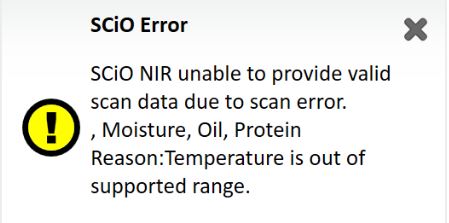
To verify that high temperatures are what is causing the sensor failure, while Mirus is still connected to the H3 GrainGage, open Diagnostics > Sensor Info and verify "SCIO Temperature." If you are no longer on the machine, the SCIO NIR sensor temperature is recorded in the backup log file for each plot harvested. By default, the backup log files are located at:C:\HarvestMaster\Mirus\Backups. These files are saved in a comma-seperated variable (.CSV) format and can be viewed with Microsoft Excel.
Fix
Harvest during a cooler part of the day.
If this is not an option, outlined below are a couple suggestions to reduce the temperature of the sensor:
Use a heat barrier between the engine of the machine and the H3 GrianGage.
If GrainGage is protected from the wind by a separate door or enclosure, remove doors to the GrainGage to allow for more air circulation around SCIO NIR sensor. If the GrainGage is exposed to the wind, we do not recommend removing the GrainGage doors because wind can negatively affect your weight data.
NOTE: We do not recommend using a fan to circulate air around the GrainGage because the air movement can negatively affect the weight data.
For further assistance, contact the HarvestMaster Field Service Engineers.
Phone Number: 435-753-1881
Email: hmtechsupport@junipersys.com