Mirus installation fails due to folder permissions
Problem
Mirus requires administrative permissions to be installed correctly. In most cases, installing Mirus using an administrator user account should install things correctly and no additional setup is required to run Mirus. Occasionally however, the installer does not have sufficient privileges to create the required directories inside of the C: drive in C:\HarvestMaster\Mirus. If the install fails to create this directory Mirus will not run. This FAQ is an explanation of how to manually correct this problem.
The Fix
Ensure the file path C:\HarvestMaster exists. If it does not, create it.
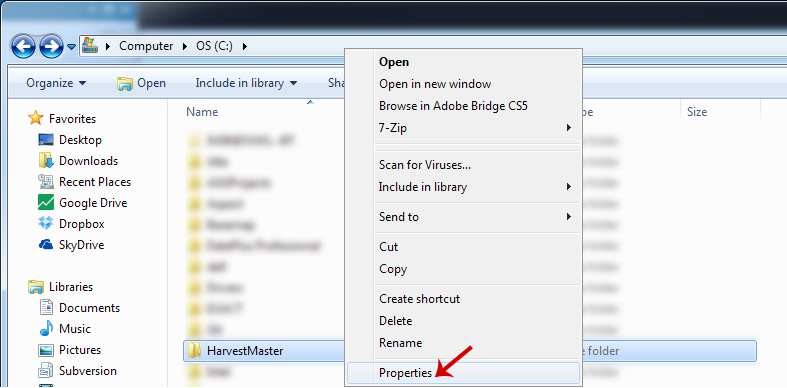
ifOnce you’ve created the folder, right-click and select Properties.
Select the Security tab in the properties window.
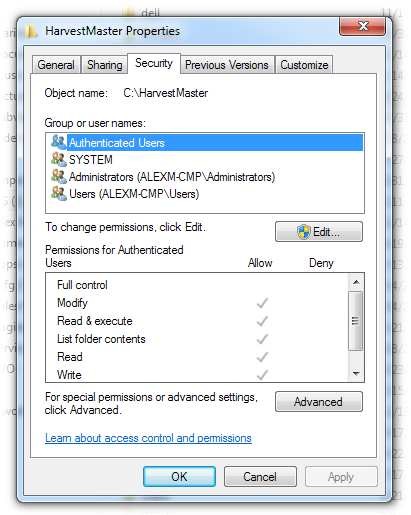
Click
 . (On some machines the edit button may not be visible, continue to step 5.)
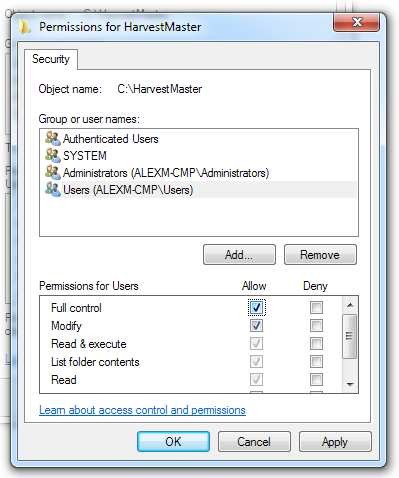
Select Users from the list of Groups or user names.
NOTE: If prompted that the permissions are “out of order” make sure to select the option to “Re-order” the permissions.Select the checkbox Full Control: Allow for the Permissions for Users.
Click Apply
Start the Mirus Install again.
If the problem persists, contact the HarvestMaster Field Service Engineers. For contact information, see Contact a HarvestMaster Field Service Engineer.
Phone Number: 435-753-1881
Email: hmtechsupport@junipersys.com
Address: 1132 W 1700 N, Logan, UT 84321